Agent Components
Here we discuss the details to config different types of agent.
Agent is the basic building block of Gentopia. It uses a single yaml config file to assemble agent’s essential components.
These components include:
name: Unique agent name, visible by other agents.version: Agent version, can be used to track agent update.type: Defining the agents’ interaction logic with the environment.description: Description of agent usage, visible by other agents.target_tasks: List of tasks or examples the agent is specialized for, non-visible to other agents.llm: A dictionary of LLM info driving the agent, includingmodel_nameandparams.prompt_template: A prompt template bound to the agenttypeto instructllmin-context.plugins: A list of tools or other agents to be invoked by the agent.memory: Configurate supported agenttypeto enable long/short term memory retrieval.
Basics
name String | Unique identifier of the agent. During agent interaction, it is the keyword to be referred by other agent calls. Therefore you should avoid using lengthy, meaningless or wierd names to confuse LLMs.
version String | It is non-visible to other agents and only used for tracking agent updates.
type String | Defining agent interaction paradigm with plugins. Currently supported types are vanilla, react, rewoo, openai, openai_memory.
description String | Description of agent usage. During agent interaction, it is the instruction message sent to other agents.
You should briefly discuss the strength of this agent, when to use it, expected input/output, any some special notes.
target_tasks List[String] | Non-visible to other agents. Use it to tell people the expected usage. It will also be used for indexing and agent search in GentPool.
LLM
llm Dict | LLM driving the agent behavior. Usually a dictionary of model_name and params,
and if the agent type includes multiple LLM instances, specify them separately (see rewoo template for example).
OpenAI LLMs
If you specify model_name as one of the following, the agent will use OpenAI API for LLM service.
gpt-3.5-turbotext-davinci-003gpt-4gpt-3.5-turbo-16kgpt-4-32kgpt-3.5-turbo-0613gpt-4-0613gpt-3.5-turbo-16k-0613gpt-4-32k-0613
The params field for OpenAI LLMs contains following optional fields to specify. Here are the default values:
max_tokens: int = 2048
temperature: float = 0.2
top_p: float = 1.0
presence_penalty: float = 0.0
frequency_penalty: float = 0.0
n: int = 1
stop: list = []
For the meaning of each parameter, please refer to OpenAI API.
Note that for these models you need to declare your OPENAI_API_KEY in the .env file as described in Installation.
As of July 2023, the these models introduce following costs by token usage:
"gpt-3.5-turbo": {"prompt": 0.0015 / 1000, "completion": 0.002 / 1000},
"gpt-4": {"prompt": 0.03 / 1000, "completion": 0.06 / 1000},
"gpt-3.5-turbo-16k": {"prompt": 0.003 / 1000, "completion": 0.004 / 1000},
"gpt-4-32k": {"prompt": 0.06 / 1000, "completion": 0.12 / 1000},
"gpt-3.5-turbo-0613": {"prompt": 0.0015 / 1000, "completion": 0.002 / 1000},
"gpt-4-0613": {"prompt": 0.03 / 1000, "completion": 0.06 / 1000},
"gpt-3.5-turbo-16k-0613": {"prompt": 0.003 / 1000, "completion": 0.004 / 1000},
"gpt-4-32k-0613": {"prompt": 0.06 / 1000, "completion": 0.12 / 1000},
HuggingFace Open LLMs
HuggingFace Open LLMs are model weights from HuggingFace model hub downloaded for Causal Inference. Gentopia encourages use of open LLMs to improve agent scalability and deployability. Therefore we support a wide range of them listed in model_card together with potential 8-bit / 4-bit quantization tricks like QLoRA.
To use HuggingFace Open LLMs, specify model_name as one of the following:
t5-vicuna-3breplit-3bcamel-5bmpt-7bredpajama-7bredpajama-instruct-7balpaca-lora-7balpaca-lora-13bkullmstablelm-7bos-stablelm-7bflan-3bbaize-7bgpt4-alpaca-7bvicuna-7bbaize-13bvicuna-13bgpt4-alpaca-13bflan-11bstable-vicuna-13bcamel-20bstarchat-15bstarchat-beta-15bevolinstruct-vicuna-7bevolinstruct-vicuna-13bguanaco-7bguanaco-13bguanaco-33bfalcon-7bfalcon-40bwizard-falcon-7bwizard-falcon-40bairoboros-7bairoboros-13bsamantha-7bsamantha-13bsamantha-33bwizard-vicuna-30bwizardlm-13bwizardlm-30b
Following are default values for optional params field for you to tweak.
device: str = 'cpu'  # One of ['cpu', 'mps', 'gpu', 'gpu-8bit', 'gpu-4bit']
temperature: float = 0.0
top_p: float = 1.0
max_new_tokens: int = 1024
< Disclaimer > Due to short of resource, we are not able to test all the models as of July 2023. So using above OpenLLMs might introduce unexpected errors or performance. If you do, please pin us under Issues. There are tons of upcoming Open LLMs we plan to test and build into Gentopia, such as Llama2. Most importantly, NOT all Open LLMs allow commercial use. Please check the license of each model on HuggingFace before using them for commercial purposes. Gentopia unconditionally aligns with the license of the original model and does not take any responsibility for the license violation.
Other LLM Source
We don’t yet support other LLM as of July 2023. However, we are aware of some excellence for the following LLM sources and plan to include them in the near future.
Anthropic Claude 2with 100k max context length, especially powerful for long context usage.Google Bardseems like the first published LLM for inherit Multi-Modality.
Prompt Template
PromptTemplate is basically an f-string template with variable placeholders and validation check. Since strings are the primary methods to communicate among LLMs, we create a placeholder for custom variables while fixing the major structure that defines LLM completion paradigm.
For clarity of config, prompt_template is usually coupled with !prompt config operator to hint the agent assembler to look for
corresponding PromptTemplate instance in working environment. Following are built-in prompts default to each agent types.
Vanilla, OpenAI, OpenAI_Memory
from gentopia import PromptTemplate

VanillaPrompt = PromptTemplate(
    input_variables=["instruction"],
    template="""{instruction}"""
)
ReAct
from gentopia import PromptTemplate

ZeroShotReactPrompt = PromptTemplate(
    input_variables=["instruction", "agent_scratchpad", "tool_names", "tool_description"],
    template=
"""Answer the following questions as best you can. You have access to the following tools:
{tool_description}.
Use the following format:

Question: the input question you must answer
Thought: you should always think about what to do

Action: the action to take, should be one of [{tool_names}]

Action Input: the input to the action

Observation: the result of the action

... (this Thought/Action/Action Input/Observation can repeat N times)
#Thought: I now know the final answer
Final Answer: the final answer to the original input question

Begin! After each Action Input.

Question: {instruction}
Thought:{agent_scratchpad}
    """
)
ReWOO
from gentopia import PromptTemplate

ZeroShotPlannerPrompt = PromptTemplate(
    input_variables=["tool_description", "task"],
    template=
"""You are an AI agent who makes step-by-step plans to solve a problem under the help of external tools.
For each step, make one plan followed by one tool-call, which will be executed later to retrieve evidence for that step.
You should store each evidence into a distinct variable #E1, #E2, #E3 ... that can be referred to in later tool-call inputs.

##Available Tools##
{tool_description}

##Output Format (Replace '<...>')##
#Plan1: <describe your plan here>
#E1: <toolname>[<input here>] (eg. Search[What is Python])
#Plan2: <describe next plan>
#E2: <toolname>[<input here, you can use #E1 to represent its expected output>]
And so on...

##Your Task##
{task}

##Now Begin##
"""
)

ZeroShotSolverPrompt = PromptTemplate(
    input_variables=["plan_evidence", "task"],
    template=
"""You are an AI agent who solves a problem with my assistance. I will provide step-by-step plans(#Plan) and evidences(#E) that could be helpful.
Your task is to briefly summarize each step, then make a short final conclusion for your task.

##My Plans and Evidences##
{plan_evidence}

##Example Output##
First, I <did something> , and I think <...>; Second, I <...>, and I think <...>; ....
So, <your conclusion>.

##Your Task##
{task}

##Now Begin##
"""
)
< Important > When you customize your own prompt, do NOT change the input_variables field since they are expected
by each agent type. Instead, you can create some context shift by adding hints, rules, identity, etc, to optimize your agent
response for targeted tasks. Finally, you can use !prompt operator to use your customized prompt in config.
Check out this short tutorial for example.
Plugins
Plugins enables agents to interact with external tools or other agents. LLMs can benefit from plugins to extend their capabilities beyond language models, namely
Retrieve unseen / unmemorized world knowledge during pretraining. eg. News, private data of your company, complex math problems, etc.
Take actions influencing the environment. eg. Tweeting, sending emails, etc.
plugins is a List of Either[BaseTool, BaseAgent] during config.
Tool as Plugin
Tools are basically function calls in which you can pass API invocation, command execution, etc. Gentopia host an expanding amount of built-in tools.
Check out GentPool Wiki for some of them.
To use built-in tools, simply specify name:String and an optional param:Dict if needed (which will be passed to tool function at initialization).
And of course, you can easily extend BaseTool to provide a run function for your own tool, and use !tool operator to use it in config.
Check out this short tutorial for example.
Agent as Plugin
Using agent as plugin enables a single agent to interact with other agents. This simple idea can be much powerful than it seems.
Convenience - Lots of core abilities are universally demanded. eg. an agent specialized in mathematically reasoning, an agent specialized in online retrieval, etc. You shall easily include these agents from GentPool in one line instead of doing it yourself.
Specialization - Multiple ALM researches have shown that stacking irrelevant plugins, no matter in-context or through SFT, can hurt system performance. Imagine you are building a multi-task agent assisting in academic writing, decoupling tool sets for online search & summarization as one agent, and tool sets for mathematical reasoning as another, should both improve agent performance and reduce computation complexity than if you feed all tools to a single agent in one layer.
To use Agent as plugin, simply use !include operator to read yaml config of another agent as demoed in this tutorial.
You can find public agents, together with their eval info in GentPool Wiki.
Memory
Memory refers to a component enabling LLM to retrieve information out-of-context. This is usually necessary if we want to share “environmental” information to LLMs, when they get limited by max_token or lack of observation spontaneity of the env.
Early 2023, this idea of memory gives an impetus to vector database, using ANN algorithms for fast neighbor retrieval. There’s a rough idea to add historical context of LLM into vector databases, update index, and retrieve related corpus when needed. In practice, however, the performance of memory hugely depends on implementation details such as where to index, where to summarize and when to retrieve,etc.
Besides, the field of adaptive weight update by context is still in its infancy. We do NOT think summarization and index retrival is the most elegant and efficient solution for memory, but we still implement a relatively robust and speedy solution with only ~10% time overhead (see below). Meanwhile, it is also one of Gentopia’s missions to explore other possibilities.
Long & Short Term Memory
memory component is used for one of the following purposes:
Escaping context limitation of LLMs. eg. when you expect a very long conversation or task solving trajectory, exceeding the max_token limit of LLMs.
Saving token consumption. eg. when you expect to have lengthy and unnecessary tool response (like Wikipedia Search) stored in-context.
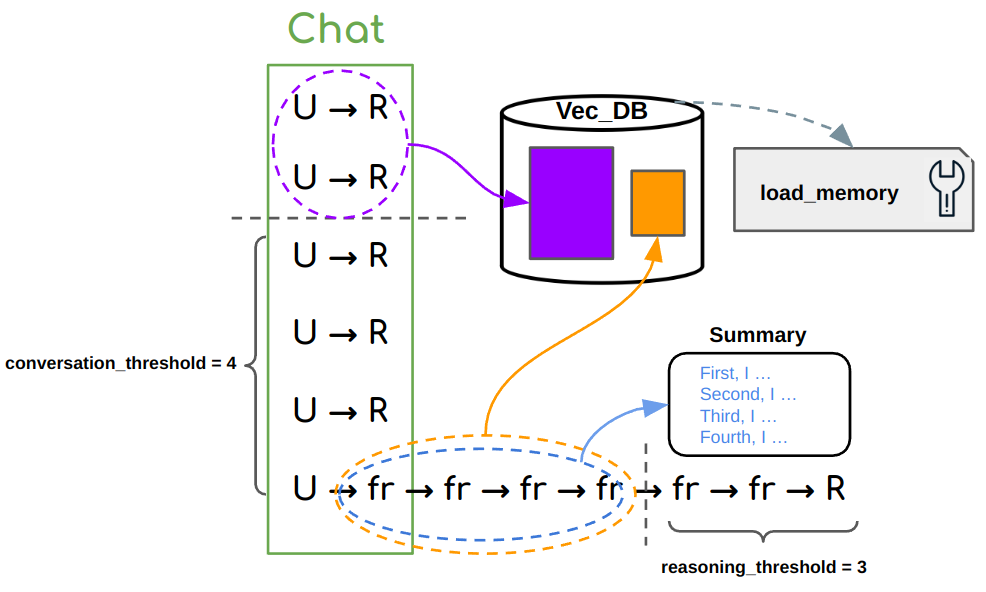
In both cases, we use memory to store context ahead of a “threshold” into vector database, replacing it with some
short “summary”, and retrieve the original corpus for more details when needed later. The term Long Term Memory
refers to the part in vector database, while Short Term Memory refers to the part in LLM context.
<2-LEVEL Memory Implementation>
Here is a memory template used for openai_memory agent.
memory:
  memory_type: chroma
  conversation_threshold: 2      # first-level memory
  reasoning_threshold: 2         # second-level memory
  params:
    index: main
    top_k: 2
Level I – Given a conversation of multiple (U,R) pairs, where U denotes User Input and R denotes Agent Response,
we use conversation_threshold to determine the maximum number of recent (U,R) pairs to be stored in LLM context.
(U,R) before the threshold will be incrementally injected to the vector database.
Level II – When new U is received, it can take arbitrary number of fr, denoting Function Response, for the agent
to take mult-step reasoning/actions that finally lead to R. We use reasoning_threshold to determine the maximum
number of recent fr to be stored in LLM context, before which fr are incrementally injected to the vector database.
Meanwhile, for the continuity of reasoning trajectory, each cached fr are summarized shortly into a sentence like “First, I xxx”,
and written into a “Summary scratchpad”, replacing fr in context. In practice, this could save thousands of tokens
per (U,R) especially when fr is very long (like Wikipedia Search).
Memory Retrieval – Once the vector database is initiated, a companion load_memory plugin indexing on the vector database is automatically attached to
the agent. The agent can call load_memory with a search query at anytime if it decides to retrieve relevant corpus.
Other Parameters – memory_type specifies the type of vector database. Currently, we support chroma and pinecone.
We recommend to start with chroma for its key-free access. params is a Dict of parameters passed to vector database,
where index is the name you give to the index, and top_k is the number of neighbors to retrieve for load_memory plugin.
Static & Shared Memory
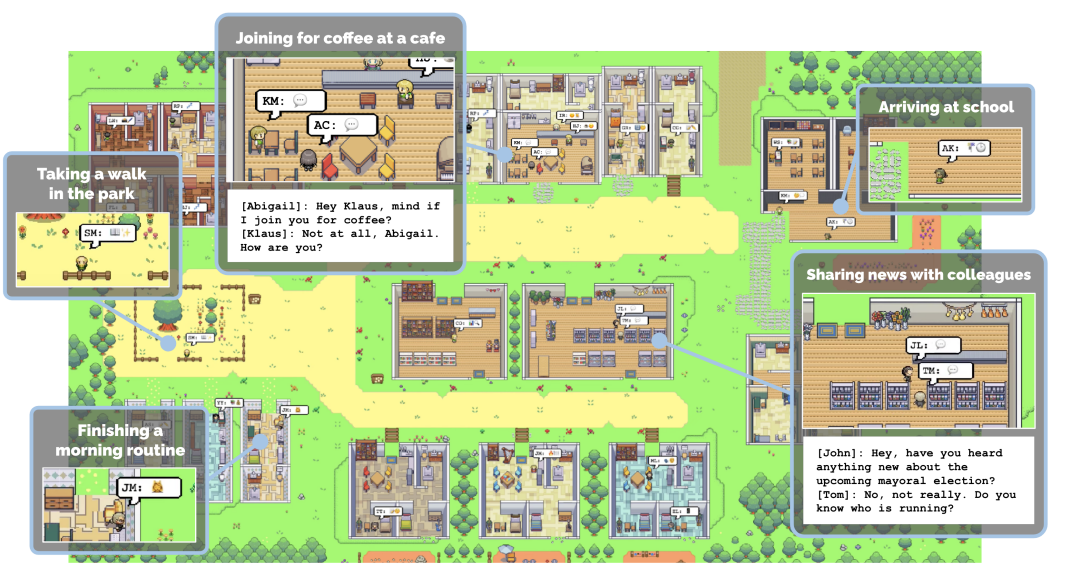
Another type of memory refers to the shared information visible to all agents in a same environment.
Agents have access to read and write to such memory when needed. Such memory can also get updated by
the environment itself, eg. to post events or notifications. This idea comes from some multi-agent simulations
like Generative Agents (picture below), Voyager and AI South Park. Gentopia is now implementing a
similar agent type called gentenv to enable such feature.
Unlike the previous Long/Short Term memory which uses vector database for neighbor search, static/shared
memory can be implemented by faster and cheap structured data like Hashmaps, or NoSQL database like mongoDB.